
If you run a multi-tenant analytics platform (one Snowflake warehouse, one set of dbt models, one Sigma workspace, serving many downstream customers or business units), two access-control problems show up almost immediately:
- Row-level security (RLS): User A should only see rows for their own account (or region, or business unit). User B, who oversees several accounts, should see all of theirs.
- Column-level masking: Certain columns (PII, financial detail, health data, or whatever your regulatory environment requires) should be visible in the clear to authorized staff, but masked for everyone else, on the same table, without maintaining two copies of the data.
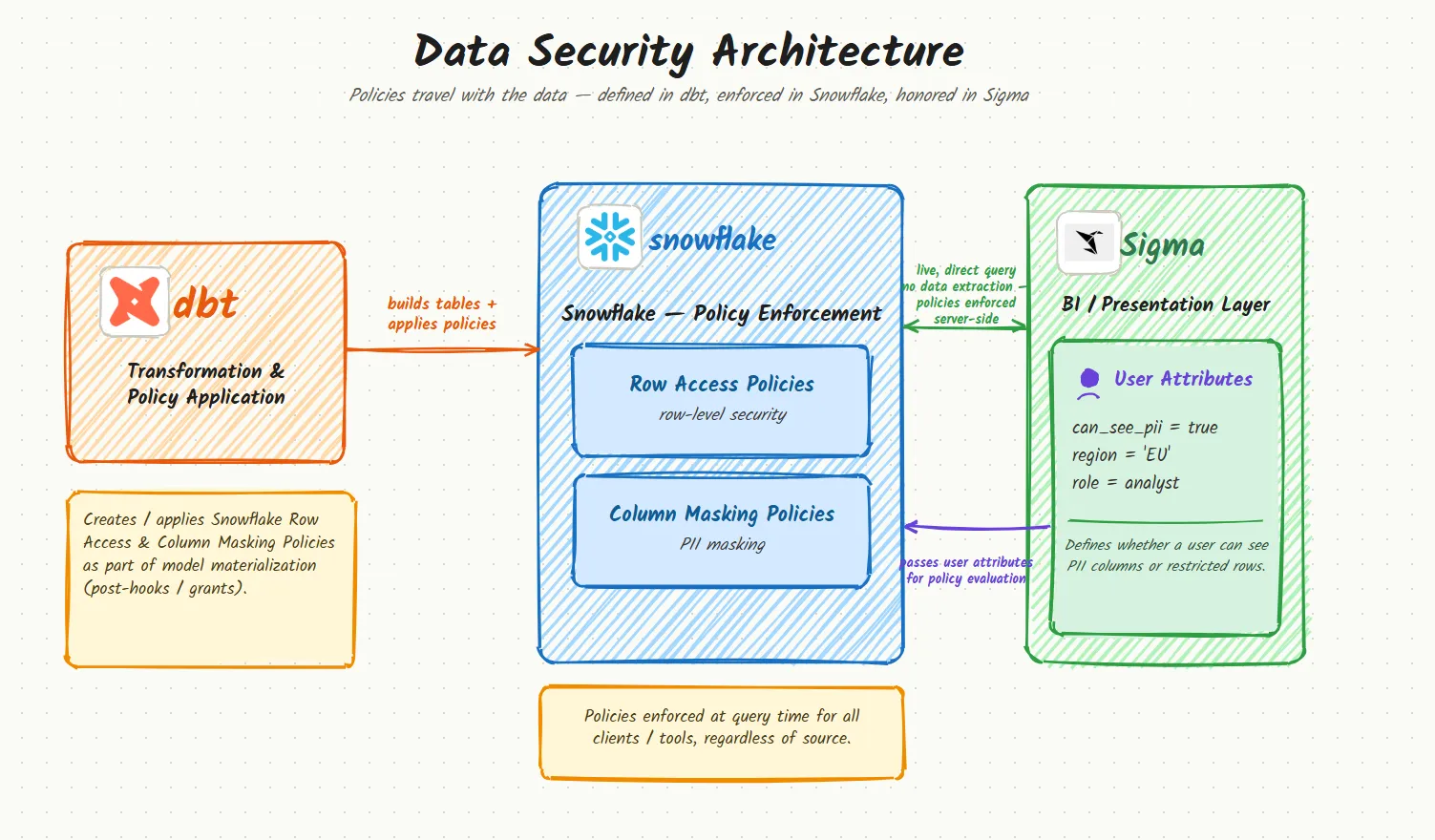
Snowflake gives you the primitives for both: row access policies and tag-based masking policies. Sigma gives you a way to pass per-user context into those policies at query time via user attributes. dbt is the glue that keeps the policy definitions version-controlled, code-reviewed, and consistently applied across every model, instead of living as one-off DDL someone ran by hand in the Snowflake UI three years ago.
This post walks through a reference implementation of both, plus the handful of sharp edges we ran into that cost real debugging time, most notably one Snowflake case-sensitivity gotcha that will silently break your masking policy and give you no error message at all.
The building blocks
Snowflake row access policies are functions that return true/false
for a row, evaluated on every query against the table they’re attached to.
Ours takes the row’s account identifier and compares it against session
context:
create or replace row access policy analytics.security.rap_account_scope as (row_account_id number) returns boolean -> case when is_role_in_session('ETL_ROLE') then true else exists ( select 1 from analytics.security.dim_account_hierarchy m where m.account_id = row_account_id ) end;Snowflake tag-based masking policies are functions attached to a tag
(e.g. PII_TYPE) rather than to individual columns. Tag every sensitive
column once, and any policy change propagates to every tagged column
automatically:
create or replace masking policy governance.masking.mask_string  as (val string) returns string ->  case    when is_role_in_session('DATA_ADMIN') then val    else sha2(val)  end;
alter tag governance.tags.pii_type  set masking policy governance.masking.mask_string;
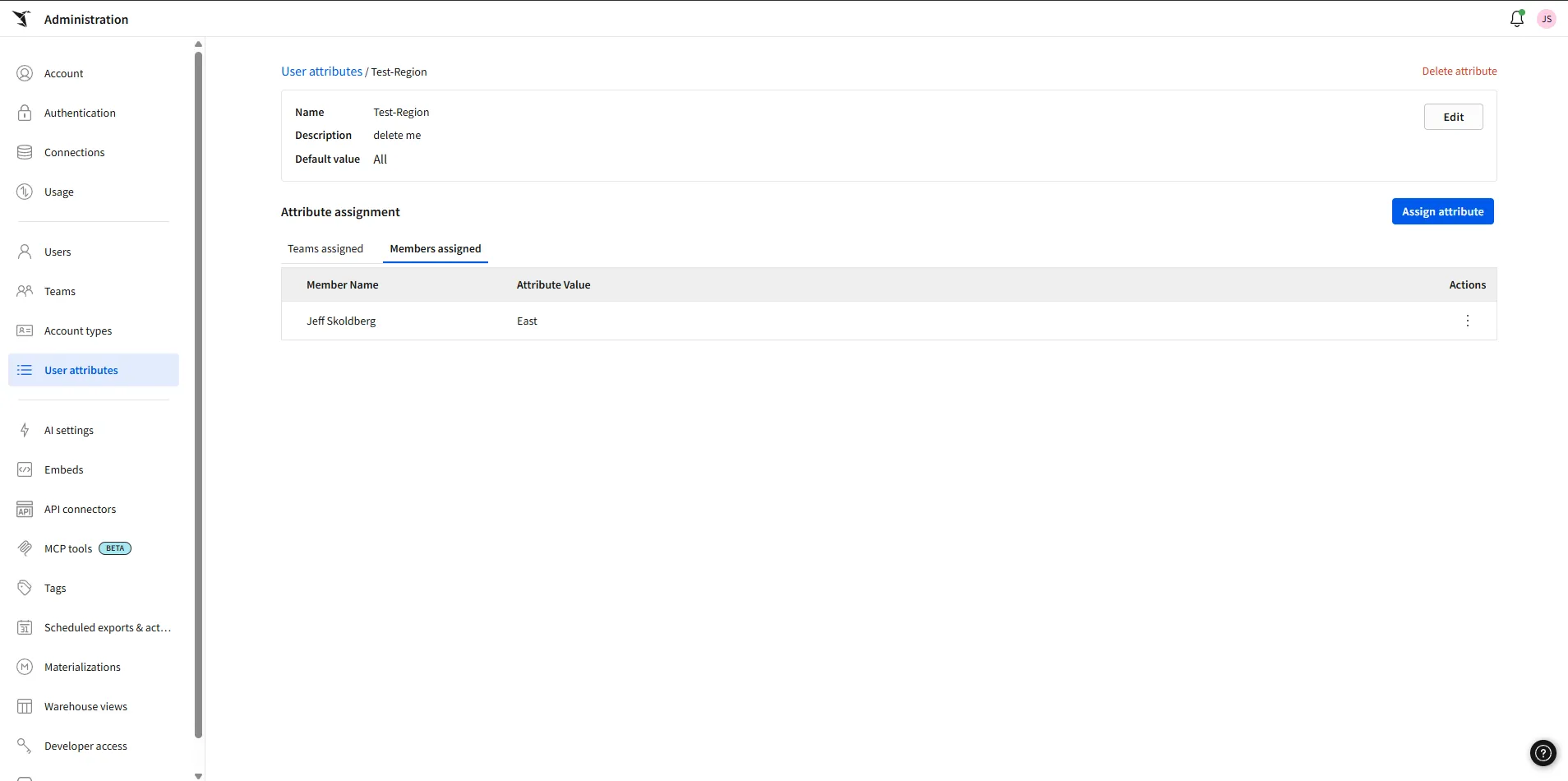
Sigma user attributes are per-user (or per-team) key/value pairs you
configure in Sigma’s admin panel, e.g. account_id = 42,
pii_authorized = true. When a user opens a workbook, Sigma passes those
values into the warehouse session as session variables, and your
Snowflake policies read them back with GETVARIABLE().
That’s the whole loop: Sigma sets a session variable, Snowflake policy reads it, rows/columns are filtered or masked before the result ever leaves the warehouse. No filtering logic lives in the BI layer, so it can’t be bypassed by a clever custom SQL element in a workbook.
Part 1: Row-level security with per-axis scoping
The requirement
Say your hierarchy is two levels deep: call them region and account (yours might be firm/client, org/team, tenant/project, whatever). You want:
- A user scoped to one region sees every account in that region.
- A user scoped to one account sees only that account, regardless of region.
- A user scoped to both sees the intersection.
- A small number of super-users see everything.
Evaluate each axis independently
A tempting but incorrect shortcut is to OR the two attributes together:
when region_id = 'All' or account_id = 'All' then true. That’s wrong:
setting either attribute to 'All' would open the entire table, even
if the other attribute is set to a specific, narrow value. A user configured
as region_id = All, account_id = 7 (intending “just account 7”) would
instead see every row in every region. The OR collapses two independent
axes into one; each axis has to be evaluated on its own:
create or replace row access policy analytics.security.rap_account_scope  as (row_account_id number) returns boolean ->  case    -- Trusted service roles bypass RLS entirely (ETL must read raw rows).    when is_role_in_session('ETL_ROLE') then true
    -- Both axes constrained: account must match AND belong to the region.    when getvariable('REGION_ID') not in ('', 'All')     and getvariable('ACCOUNT_ID') not in ('', 'All') then      row_account_id = try_to_number(getvariable('ACCOUNT_ID'))      and exists (        select 1 from analytics.security.dim_account_hierarchy m        where m.account_id = row_account_id          and m.region_id  = getvariable('REGION_ID')      )
    -- Region only.    when getvariable('REGION_ID') not in ('', 'All') then      exists (        select 1 from analytics.security.dim_account_hierarchy m        where m.account_id = row_account_id          and m.region_id  = getvariable('REGION_ID')      )
    -- Account only.    when getvariable('ACCOUNT_ID') not in ('', 'All') then      row_account_id = try_to_number(getvariable('ACCOUNT_ID'))
    -- Explicit super-user: BOTH axes set to 'All'.    when getvariable('REGION_ID') = 'All' and getvariable('ACCOUNT_ID') = 'All'      then true
    else false   -- fail closed: no attributes set, no access  end;
The rule of thumb generalizes past two axes: never let one unscoped axis
short-circuit the others. Each axis should independently narrow the result
set; only the case where every axis is explicitly waived should mean
“everything.” And default to false, not true: an unset or malformed
attribute should fail closed.
Managing the policy from dbt
Two macros, wired up as post-hooks, own the whole lifecycle:
-
create_row_access_policylives on the resolver model and owns the policy body:models:my_project:silver:dim_account_hierarchy:+post-hook:- "{{ create_row_access_policy() }}" -
apply_row_access_policylives on every gold fact and attaches that policy, passingref('dim_account_hierarchy')so the fact depends on (and builds after) the model that owns the policy:models:my_project:gold:+post-hook:- "{{ apply_row_access_policy(ref('dim_account_hierarchy')) }}"New fact tables get RLS for free the moment they land in
gold/; nobody has to remember to wire it up per-model.
create_row_access_policy re-applies the body on every run via alter ... set body, rather than assuming it was created once and left alone. Snowflake
won’t let you create or replace a policy that’s currently attached to a
table, so alter is the only way to change its behavior without an
attach/detach dance, and doing it unconditionally on every run means the live
policy can never drift from what’s in version control:
{% macro create_row_access_policy(policy_name='rap_account_scope') %}  {% if execute %}    {%- set policy_fqn = this.database ~ '.' ~ this.schema ~ '.' ~ policy_name -%}
    {%- set body -%}          case            when is_role_in_session('ACCOUNTADMIN')              or is_role_in_session('PROD_TRANSFORMER')              or is_role_in_session('DEV_TRANSFORMER') then true            when getvariable('SIGMA_REGION_ID') = 'All'              or getvariable('SIGMA_ACCOUNT_ID') = 'All'              or getvariable('REGION_ID') = 'All'              or getvariable('ACCOUNT_ID') = 'All' then true            when coalesce(getvariable('SIGMA_REGION_ID'), getvariable('REGION_ID')) not in ('', null) then              exists (                select 1                from {{ this }} m                where m.account_id = row_account_id                  and m.region_id  = coalesce(getvariable('SIGMA_REGION_ID'), getvariable('REGION_ID'))              )            when coalesce(getvariable('SIGMA_ACCOUNT_ID'), getvariable('ACCOUNT_ID')) not in ('', null) then              row_account_id = try_to_number(coalesce(getvariable('SIGMA_ACCOUNT_ID'), getvariable('ACCOUNT_ID')))            else false          end    {%- endset -%}
    {% set create_ddl %}      create row access policy if not exists {{ policy_fqn }}        as (row_account_id number) returns boolean -> {{ body }}    {% endset %}    {% do run_query(create_ddl) %}
    {% set alter_ddl %}      alter row access policy {{ policy_fqn }} set body -> {{ body }}    {% endset %}    {% do run_query(alter_ddl) %}
    {% do log('create_row_access_policy: reconciled ' ~ policy_fqn, info=true) %}  {% endif %}{% endmacro %}
Note the parameter is named row_account_id, not account_id. If it matched the
resolver table’s column name, the exists() subquery’s m.account_id = row_account_id
would silently compare the column against itself instead of against the
policy argument, which is always true and leaks every row.
apply_row_access_policy is the other half. It doesn’t touch the policy
body, it just attaches the (already-created) policy to a gold fact. It has
to be idempotent and defensive in ways the creator doesn’t, because it runs
on every fact table, in whatever order dbt happens to build them:
{% macro apply_row_access_policy(map_relation, column_name='account_id', policy_name='rap_account_scope') %}  {% if execute %}    {%- set mat = config.get('materialized', 'view') -%}    {%- set rel = 'table' if mat in ('table', 'incremental', 'snapshot') else 'view' -%}
    {#- Models without the scoping column just don't get RLS. -#}    {%- set cols = adapter.get_columns_in_relation(this) | map(attribute='column') | map('lower') | list -%}    {% if column_name | lower not in cols %}      {% do log('apply_row_access_policy: ' ~ this ~ ' has no ' ~ column_name ~ ' column, skipping.', info=true) %}    {% else %}      {%- set policy_fqn = map_relation.database ~ '.' ~ map_relation.schema ~ '.' ~ policy_name -%}
      {#- Policy may not exist yet on a partial run — skip, attach next time. -#}      {% set found = run_query("show row access policies like '" ~ policy_name ~ "' in schema " ~ map_relation.database ~ "." ~ map_relation.schema) %}      {% if found | length == 0 %}        {% do log('apply_row_access_policy: ' ~ policy_fqn ~ ' not found, skipping ' ~ this, info=true) %}      {% else %}        {#- A table holds one row access policy; re-ADD errors, so check first. -#}        {% set check_query %}          select count(*) as n          from table(            {{ this.database }}.information_schema.policy_references(              ref_entity_name => '{{ this }}',              ref_entity_domain => 'table'            )          )          where policy_kind = 'ROW_ACCESS_POLICY'        {% endset %}        {% set already = run_query(check_query).columns[0].values()[0] | int %}        {% if already == 0 %}          {% do run_query('alter ' ~ rel ~ ' ' ~ this ~ ' add row access policy ' ~ policy_fqn ~ ' on (' ~ column_name ~ ')') %}          {% do log('apply_row_access_policy: attached ' ~ policy_fqn ~ ' to ' ~ this, info=true) %}        {% endif %}      {% endif %}    {% endif %}  {% endif %}{% endmacro %}
Why this has to be a post-hook, and can’t get the same atomic-at-creation
treatment as the column tagging below: a masking tag is a per-column
property, so dbt can express it as a column-level custom constraint and
compile it straight into the CREATE TABLE statement (more on that in Part
2). A row access policy is different: it attaches to the table object,
not a column, and dbt’s contract/constraint system only renders column-level
custom constraints into DDL. There’s no equivalent inline clause dbt can
emit for “attach this row access policy” at table-creation time. Worse,
Snowflake drops the attachment entirely every time the table is
rebuilt with create or replace table (which every dbt table/incremental
run does), so re-attaching on every single run isn’t a workaround, it’s a
requirement. As of this writing there’s no dbt-native way around a post-hook
here; if that changes, it’ll be because Snowflake or dbt adds a first-class
way to declare a row access policy at the table-DDL level, the same way
with tag (...) already works for columns.
Part 2: Column masking gated by a user attribute
The requirement
Certain columns (names, identifiers, dates of birth, whatever your data classification calls “sensitive”) should be:
- Visible to internal transformation/ETL roles (they have to read raw data to build the models in the first place).
- Visible to a BI user only if their Sigma profile carries an explicit
authorization attribute, say
pii_authorized = true. - Masked for everyone else, including that same BI service account when the attribute isn’t set.
Step 1: tag the sensitive columns (skip the post-hook)
Before a masking policy can do anything, the columns it applies to need to
carry the governance tag (PII_TYPE, or whatever you call it). The
traditional way to do this from dbt is a post-hook that runs
alter table ... set tag after the model materializes:
# dbt_project.yml: the older patternmodels: my_project: +post-hook: - "{{ apply_column_tags() }}"This works, but it has a structural gap: between the moment create or replace table finishes and the moment the post-hook’s alter ... set tag
runs, the physical table exists untagged. For a table built by a
transformer role that can see unmasked data, that means there’s a real window
where freshly materialized PII sits in a table with no masking policy
attached yet. It’s usually a short window, but “usually short” isn’t a
security property.
The current, better way is to declare the tag as a native dbt column
constraint, directly in the model’s .yml contract, so it’s compiled
straight into the CREATE TABLE statement instead of bolted on afterward:
models: - name: fct_something config: contract: enforced: true columns: - name: patient_ssn data_type: varchar constraints: - type: custom expression: "with tag (governance.masking.pii_type = 'SSN')"dbt renders that into:
create or replace transient table analytics.gold.fct_something ( patient_ssn varchar with tag (governance.masking.pii_type = 'SSN'), ...) as ( ... );The tag lands atomically, at creation: there is no window where the table exists without it. This is a real, if narrow, security improvement over the post-hook, and it reads better too: the sensitivity of a column is declared right next to its name and type, instead of in a separate macro file someone has to know to go look at.
Two constraints come with it, and they matter enough to plan around:
contract: enforced: trueis mandatory. dbt only renders column constraints when the model’s contract is enforced, which means every column needs an explicitdata_typeand the model now fails to build on any column mismatch. Treat that as a feature: a typo in a tag or a dropped column becomes a build failure instead of a silently-untagged column, but it does mean adopting this incrementally, model by model, rather than flipping a warehouse-wide switch.- Tables and incremental models only. dbt does not render column
constraints into
create viewDDL at all: a view can’t carry an inline tag this way, full stop.
That second point turns out to matter less than it sounds like, because of how Snowflake masking actually propagates: a view inherits its base table’s masking policy for any column that’s a direct pass-through, with no tag of its own required (per Snowflake’s docs on tag-based masking policies: view columns derived directly from a tagged base-table column are protected automatically). The columns that genuinely need an explicit tag (and therefore still need the post-hook, since there’s no inline-constraint path for a view) are the minority of view columns built from a transformation of a sensitive value: a hash, a concatenation, an aggregation into an array. Those break the lineage Snowflake needs to auto-propagate the policy, so they need their own tag applied directly.
Net result: inline contract constraints handle tagging for every physical table your transformer roles write (closing the exposure window that mattered most), and the post-hook survives only for the small set of derived/transformed view columns that have no other way to get tagged. That’s a much smaller surface than “tag everything through one post-hook,” and it’s worth the migration effort model by model.
One rough edge to know about before adopting this broadly: if your dbt
setup uses state-aware selection (flags: manage_state: true with a
defer target, e.g. dbt build --select state:modified+), the inline
with tag (...) clause in the generated CREATE TABLE DDL can currently
trip up dbt’s state-service SQL parser: it emits a warning and fails to
extract source-table lineage for that specific model, even though the build
and the tag application both succeed. This is a known, open upstream issue
as of this writing, not a misconfiguration on your end. If your team leans
heavily on state-based selection for CI, test on a non-critical model first
and weigh whether the atomicity win is worth losing lineage extraction on
that model until it’s fixed. If you don’t use state-based selection, this
doesn’t affect you at all.
Step 2: define what the tag does
alter masking policy governance.masking.mask_string set body ->  case    -- Tier 1: trusted pipeline roles, always clear.    when is_role_in_session('DATA_ADMIN')  then val    when is_role_in_session('ETL_ROLE')    then val    when is_role_in_session('TRANSFORMER') then val
    -- Tier 2: the BI tool's service role is fail-closed on the attribute.    when is_role_in_session('BI_SERVICE_ROLE') then      case        when lower(coalesce(getvariable('PII_AUTHORIZED'), '')) = 'true'          then val        else sha2(val)      end
    -- Tier 3: everyone else, static role-based fallback, unchanged.    when is_role_in_session('REPORTER_PII') then val    else sha2(val)  end;
Ordering matters: if your BI service account is also granted a
“can-see-PII” role directly (common, since the same account often serves both
authorized and unauthorized users), that broader role’s when clause must
come after the attribute-gated branch, or case will match it first and
the per-user attribute never gets consulted. case returns on first match:
put the most specific check first.
The gotcha that will eat an afternoon: GETVARIABLE is case-sensitive
This is the one worth bookmarking. When a BI tool (or any client) issues:
set pii_authorized = 'true';with the variable name unquoted, Snowflake stores the variable name in
upper case (PII_AUTHORIZED), per standard identifier-folding rules.
But GETVARIABLE() matches the name you pass it literally, case
sensitively. It does not fold your argument the way the parser folds an
unquoted SET.
The result: a masking policy written as
getvariable('pii_authorized') -- lower-case literalwill always return NULL, even though the variable is set and even though
SHOW VARIABLES shows it right there with a value. There’s no error, no
warning: the case statement just quietly falls through to the masked
branch, every single time, for every user, regardless of their actual
authorization. This is exactly the kind of bug that fails safe (data stays
masked) so it can sit unnoticed for a long time, until an authorized user
files a ticket asking why their access apparently isn’t working.
The only variable-name syntax that is case-insensitive is the $name
shorthand ($pii_authorized), which most masking-policy code doesn’t use.
Takeaway: always read session variables with GETVARIABLE('UPPER_CASE_NAME')
unless you have positive confirmation of how the producer set the name. If
you’re not sure, don’t guess: query it directly:
select getvariable('PII_AUTHORIZED') as upper_read, getvariable('pii_authorized') as lower_read;Building a one-query diagnostic probe
When “the attribute isn’t working” and you can’t tell whether the problem is Sigma not sending it, Snowflake not receiving it, or the policy not reading it correctly, don’t guess: make the session state directly observable. We built a tiny diagnostic view for exactly this:
create or replace view analytics.gold.v_session_probe asselect getvariable('pii_authorized') as attr_lower, getvariable('PII_AUTHORIZED') as attr_upper, getvariable('REGION_ID') as region_id_var, getvariable('ACCOUNT_ID') as account_id_var, current_role() as current_role, is_role_in_session('BI_SERVICE_ROLE') as bi_role_in_session;Grant it to the relevant roles, drop it into a workbook as a plain
select * from v_session_probe, and the output tells you immediately which
layer is misbehaving: in our case, attr_upper = 'true' while
attr_lower = null pointed straight at the case-sensitivity issue above.
Delete the view once you’re done; it has no purpose beyond debugging and
shouldn’t linger as a permanent object.
Part 3: Keep it in dbt with a repeatable-migration pattern
Masking policy bodies change over time (new roles, new logic, new exceptions). Two constraints shape how you should manage that:
create or replace masking policyfails while the policy is actively attached to a tag or column (which, if it’s doing its job, it always is).- You still want the policy body to be a single, version-controlled source of truth, not something someone edits live in the Snowflake UI during an incident and never backports to your migration repo.
The pattern that resolves both: a repeatable migration (in whatever
migration tool you use: Flyway, schemachange, sqlfluff-based custom
tooling, dbt run-operations) that always issues alter masking policy ... set body -> instead of create or replace. Repeatable migrations re-run
whenever their file content changes, so the file is the live definition:
apply it, and drift between environments (dev/qa/prod) is structurally
impossible as long as the same file gets applied everywhere.
-- R__masking_policies.sql (re-applies whenever this file's content changes)use role DATA_ADMIN;
alter masking policy governance.masking.mask_string set body ->  case    when is_role_in_session('DATA_ADMIN') then val    ...  end;
Document the precedence in a comment block at the top of the file (which role wins if a session holds multiple roles simultaneously) because that ordering is exactly the kind of thing a future editor will get wrong six months from now without a truth table in front of them:
-- session | pii_authorized | result-- ---------------------------------+------------------+---------- ETL / transformer roles | (any) | clear-- BI service role | 'true' | clear-- BI service role | unset / 'false' | MASKED-- direct PII-authorized role | (any) | clear-- base reporting role | (any) | MASKEDA note on identifier consistency across systems
One failure mode worth flagging even though it’s not strictly an RLS/masking bug: if the identifier your access-control map uses (say, a hand-maintained crosswalk table) doesn’t match the identifier your fact tables expose to end users, you get silent, partial fail-closed behavior: some accounts scope correctly, others return zero rows, and it looks like a bug in the policy when it’s actually a data-modeling mismatch upstream. If your RLS maps a business hierarchy through an intermediate table, audit that every identifier your reporting layer displays is the same identifier your access table matches against, not just “the same conceptually,” but the same literal value space. A crosswalk that resolves by name instead of by a stable key is a sign this hasn’t been reconciled yet.
Checklist for your own implementation
- Row access policy evaluates each scoping axis independently: no single unscoped axis should short-circuit the others into “see all.”
- Explicit “see everything” requires every axis to be explicitly waived, not just one.
- Default branch is
false(fail closed), nottrue. - Masking policy checks trusted pipeline roles first, before any attribute-gated logic.
- Attribute-gated
casebranches are ordered before any broader role-based branch that the same service account might also hold. - All
GETVARIABLE()calls use the exact case the variable was actually stored under, verified with a probe query, not assumed. - Policy bodies live in version control and are applied via
alter ... set body(or your platform’s equivalent), never edited live and never left as a one-offcreate. - A truth table documenting role/attribute precedence lives in a comment at the top of the file that defines the policy.
- Identifiers used for access-control matching are audited against the identifiers your reporting layer actually displays.
- Sensitive columns on physical tables are tagged via an inline,
contract-enforced
constraints: type: customexpression, not a post-hookalter ... set tag, so the tag lands atomically at creation with no untagged window. - The post-hook is retained only for the narrow case an inline constraint can’t cover: view columns built from a transformation (hash, concat, aggregate) of a sensitive value, which don’t inherit masking automatically the way a direct pass-through column does.
Get these right once, encode them in dbt, and every new table that lands in your gold layer inherits correct row- and column-level security automatically, with no per-model checklist and no “did someone remember to grant this” Slack thread three months later.

About the Author
Jeff is a Data and Analytics Consultant with nearly 20 years experience in automating insights and using data to control business processes. From a technology standpoint, he specializes in Snowflake + dbt + Tableau. From a business topic standpoint, he has experience in Public Utility, Clinical Trials, Publishing, CPG, and Manufacturing. Jeff has unique industry experience in Supply Chain Planning, Demand Planning, S&OP. Hit the chat button to start a conversation!
